Uncategorized

Restaurant Fire Video Surveillance Recovery Victory

Comments Off Written on May 16th, 2010 by
Categories: Uncategorized

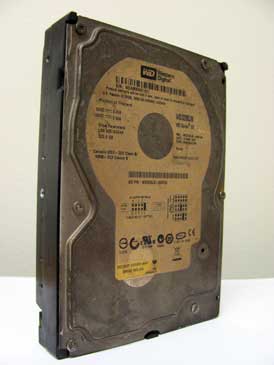
Fire Damaged Hard Drive Data RecoveryThis week we were contact by a lawyer representing a Westchester restaurant the recently suffered a devastating fire.  They need to determine the cause of the fire, but the video surveillance system burned with the building.

The lawyer came to us with the charred hard drive from the video recording system.  The restaurant’s insurance claim critically rested upon whether or not this video could be recovered, and they need it done yesterday.

We jumped on this recovery job with bated breath at every step of the way.  Twenty four hours later we celebrated the successfully recovery of every single video stored on the disk.

Special thanks goes out to Paul of our recovery team for his excellent handling of this job.
Successful RAID 0 Recovery

2 comments Written on May 2nd, 2010 by
Categories: Uncategorized

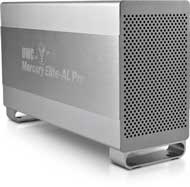
 Recovery of a RAID 0 arrayA New York sound studio contacted us this week.  They had two terabytes of music artists and film soundtrack recording projects stored on an external hard drive that suddenly stopped working. 

When we got the drive in we discovered that this external drive consisted of two hard drives in what is called a RAID 0 array.  RAID 0 splits all files between the two drives.  We were shocked that the manufacturer is selling this product, as any expert in the computer industry will tell you that RAID 0 should never be used.  The problem is that if either hard drive fails, all your data goes with it.  Each year you have twice the odds of losing your files when they are stored this way.  Moreover, recovering RAID arrays is far more complicated than recovering a standard hard drive.  After extracting the data from the failed drive, the files are still not readable until you can recreate the array with the exact configuration used by the devices manufacturer.

This two hard drive, two terabyte RAID recovery took four days to complete.  We restored every audio file on these disks.  Unfortunately, 50% of the file names were irrecoverably lost.

Our advice to anyone out there using RAID 0 storage: Make sure you have a backup of that RAID array.  If you are purchasing external storage devices, purchase them in pairs so that you can back one up onto the other.

Accidentally Deleted Files

No Comments » Written on April 30th, 2010 by
Categories: Uncategorized

Recovery of Accidentally Deleted FilesOne of our clients was recently cleaning up the files on his business laptop and he accidentally deleted a large folder containing years of his work.  He had emptied and recycle bin.  The files were gone.  He panicked. 

Instead of waiting for us, he purchased, downloaded, and installed a $49 utility for restoring deleted files.  The ran the application and chose to restore the files to the same hard drive they were deleted from.

It didn’t work.  The software identified a laundry list of files that were recently deleted, but when he restored them only 25% of these files would open.  Why?  The answer lies in what happens when a file is deleted.

When you delete a file on your computer the actual data on your hard drive is not immediately deleted.  Even though you don’t see the file anymore, it is still there.  However, this data is marked by the operating as usable blank space.  Next time you save a file, the computer will use this space.  When this happens, your files will be irrecoverably destroyed.

When this client installed the recovery utility on this drive he destroyed some of the very data he was hoping to recovery.  Following this when he chose to save the found files onto the drive he was recovering from, he destroyed almost all of them during the process.  The result was that only a very small portion of the files he wanted back were available.  After he did this, there was nothing more we could do.  It was a sad event in that it was so available.  If he hadn’t attempted the recovery himself we would have been able to recover almost every file.

If you accidentally delete your files — do not panic!  Turn the computer off.  Call us.  If you want your files back, let a trained professional do it for you.